

Affichage des articles dont le libellé est tools. Afficher tous les articles
Affichage des articles dont le libellé est tools. Afficher tous les articles
By Widad EL HANAFI, E-Mediat Morocco Country Director
To develop a fundraising plan for your NGO requires that you follow some basic steps. As you finish preparing your plan and get into the implementation phase, you need to integrate some social media tools to boost your plan and adopt an ongoing evaluation process.
Below are some basic steps that shape the preparation of a fundraising plan:
Objectives & Mission
Specific
Measurable
Achievable
Relevant
Timely
|
Target
|
Research
|
Design your implementation plan & structrure
|
Donation Methods:
When you work on your fundraising plan, think about diversifying donation methods and channels. If your supporters cannot use one method, they can use another one. Your donation methods may include: - Mailing, print, phone - Online & E-giving - Add a Donate widget into your blog or insert a donation form into your blogpost - Direct donation - Wire transfers - Credit card donations - Fundraising during an event | |
Implementation phase:
When you finalise your plan, you’ll need to start implementing your action plan according to your fundraising calendar. Bear in mind that on this phase, you need to keep your fundraising objective in front of you. During this phase, you can adjust and improve your plan according to the actual context and this is importance of follow up and evaluation. Evaluation need to be an on going process within your plan.

Integrating social media tools into your plan:
Now that we have briefly overviewed some basic steps to develop a fundraising plan, we will move to focus on integrating social media tools into your NGO fundraising plan. There are several social media tools that allow and help NGOs achieve their fundraising purposes. Some are simple and for free, others are more advanced and requires payment. Bear in mind that integrating social media tools into your plan will not be doing the whole job for you. It will help spread the word and promote your campaign but you still need to work into implementing your action plan and fundraising calendar, engaging your network, and evaluating your work.
I always recommend to NGOs to start with the basic tools and once they get some practice, they can them move to more advance tools if they can afford that.
I will be focusing on simple fundraising methods that NGOs can adopt to support their organisations and communities.
 Fundraising through your blog:
When you decide to launch a fundrasing campaign, write a blog post to explain your fundraising objective and mission and insert a form within your blog post to help your audience reach out with you. Google Docs allow the possibility to insert a form into your blog just by embedding the form code into your text message.
The steps are as follow:
1- Draft your fundraising campaign article. Think about adding and inserting photos and videos that are related to your article.
2- create a online form using google Docs for example
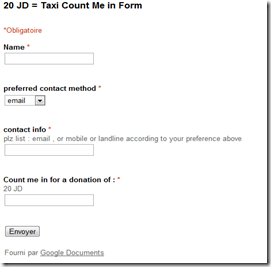
3- Embed your form code into your article and publish your post.
A good example of this is illustrated through an initiative by Nermeen Obeidat, a friend and colleague from Jordan who launched the 20JD= Taxi campaign on April 21 to support a family in Amman.

Nermeen Obeidat explains “when I started this campaign, I was targeting my network of 750 friends on facebook. On the first day, I only got the attention of 31 of my friends and by day 6 of the campaign, many networks got involved, free agents, social and communication professionals and the level of engagement got increased. Today (April 26) we reached 3500 JD and the campaign will continue to reach its objective.
Nermeen describes the campaign’s achievements and challenges in the following way:

Integrating social media tools into your plan:
Now that we have briefly overviewed some basic steps to develop a fundraising plan, we will move to focus on integrating social media tools into your NGO fundraising plan. There are several social media tools that allow and help NGOs achieve their fundraising purposes. Some are simple and for free, others are more advanced and requires payment. Bear in mind that integrating social media tools into your plan will not be doing the whole job for you. It will help spread the word and promote your campaign but you still need to work into implementing your action plan and fundraising calendar, engaging your network, and evaluating your work.
I always recommend to NGOs to start with the basic tools and once they get some practice, they can them move to more advance tools if they can afford that.
I will be focusing on simple fundraising methods that NGOs can adopt to support their organisations and communities.
 Fundraising through your blog:
 When you decide to launch a fundrasing campaign, write a blog post to explain your fundraising objective and mission and insert a form within your blog post to help your audience reach out with you. Google Docs allow the possibility to insert a form into your blog just by embedding the form code into your text message.
The steps are as follow:
1- Draft your fundraising campaign article. Think about adding and inserting photos and videos that are related to your article.
2- create a online form using google Docs for example

3- Embed your form code into your article and publish your post.
A good example of this is illustrated through an initiative by Nermeen Obeidat, a friend and colleague from Jordan who launched the 20JD= Taxi campaign on April 21 to support a family in Amman.

Nermeen Obeidat explains “when I started this campaign, I was targeting my network of 750 friends on facebook. On the first day, I only got the attention of 31 of my friends and by day 6 of the campaign, many networks got involved, free agents, social and communication professionals and the level of engagement got increased. Today (April 26) we reached 3500 JD and the campaign will continue to reach its objective.
Nermeen describes the campaign’s achievements and challenges in the following way:
- Some of those who donated extended the effort into their networks,
- The campaign was creative in drawing attention to a humanitarian issue but in a simple, modern and positive manner,
- The objective is SMART as everyone can skip 20 JD which = shisha and a drink in Jordan,
- Not mentioning how people can donate created some confusion but at the same time offered some flexibility for people to chip in in different ways,
The first thing that draw my attention to this initiative was the name of the campaign. I saw 20JD=Taxi on a flyer on Nermeen’s facebook profile and I was eager to know what was this about. The name of the campaign was inspired from its mission and objective. Also, Nermeen has also sent a clear call to action to her network which has helped encourage influencers within her network to contribute to the success of the campaign. She also kept updating her network until the end of the campaign:

Another tool that you need to make sure to add to your blog is the ShareThis button. This will help your followers to share your blogposts with their network.
 Fundraising through Facebook:
 - Use Facebook to tell your friends that you’re raising money for a good cause. Create a page for your cause and invite your friends to join and keep them updated on your progress and ask their ideas and insights and ask them to contribute to your goal.
- Share your blogposts about your fundraising campaign in your Facebook page,
- Create a flyer/ logo for your campaign and use it as your Facebook cover page and photo ID,
- Mention your fundraising drive on your Facebook status so that your closest friends and family can chip in and assist,
- Encourage Dialogue in your Facebook page,
- Keep updating your audience and sharing your fundraising campaign updates, challenges, and achievements.
Fundraising through twitter:
Twitter is an effective tool for your fundraising campaign. Use your NGO Twitter account to promote your campaign and gain your followers’ support. Select the right # hashtags based on your campaign’s name and mission and send regular tweets to update your audience and gain more support by requesting your followers to retweet. In case you start having many updates, start using Buffer to schedule your tweets.Fundraising through Pinterest:
- Pin your cause: create a board for your fundraising campaign and pin your blogposts, fundraising events photos, logo, flyer,…


- Encourage your supporters to pin for you and add the Pin it Button to your blog to help your network support your cause when you publish updates on your campain on you blog
 Fundraising through Youtube:
 - Create videos to promote your campaign, inform your audience and convey your message,
- Create videos to update your audience, followers and donors,
- Create your videos about the impact and results of your fundraising campaign and the way funds have served your cause and community. This will help make you NGO accountable for its work and build trust with your network and encourage them to support you again.
Join E-Mediat Morocco on Facebook and Twitter via @emediatmorocco

Prepared by El Mehdi Zeroual, E-Mediat Morocco Training Coordinator
YouTube is one of the best tools for marketing since it is ranked second (right after Google) as a search engine. Also YouTube is the first website for diffusion, broadcasting and sharing videos online. And the best of it is that it is free for both viewing and sharing.
In addition
to Gmail and Blogger, YouTube is another Google product that was updated. The
new interface includes changes on the home page, channel page and the overall
design. This new YouTube interface shares a number of aspects with other
updated Google products.
Since the
homepage is the first page that users see and because it is the gateway to
millions of videos, Google made in-depth changes on it such
as bigger video thumbnails. In addition, YouTube is getting more social by
adding a number of functionalities including:
-
Integration of a sidebar for easier
access to content
-
Highlighting recent Channel activity.
-
Simplified subscription system to channels.
-
Link YouTube account to Google+ and Facebook
-
New customizable homepage feed

Since Google gives more focus to channels on the new homepage, it wouldn’t be complete if they didn’t update channels as well. Channels now are simpler and customizable. New templates are added to respond to all users’ needs. Channels administrators can organize and present their content in a more simplified way. Other than updates on design, Google’s goal is to help users find videos they are looking for easily.

To bring
Homepage and Channels designs together, Google used the same paint for the
whole site. The new design is called Cosmic Panda which is cleaner and simpler
as all other Google products new designs.

By El Mehdi Zeroual, Training Coordinator E-Mediat Morocco
As we have
discussed in the previous article about the New
Gmail Interface, things looks a little different for many Google products,
and in this article we will discuss the new updates on Blogger.
The new
Blogger looks completely different than the previous version. The new design is
cleaner and more contemporary and eye-friendly since changes also include set-up
of the page. Blogger also enhanced functionality by adding new features and strengthening
its speed.
Since
blogging is mainly about writing articles and posting them, Google engineers
made the Post Editor much simpler and wider to offer more space for writing. For
Writing in Arabic, it is better than the old version since they added the option
of starting paragraphs from the right of the page and added the Arabic as a
language of writing. So articles in Arabic look better and more organized.
Other options modified in the new version are located on the right of the
screen for easy access.
“Planning” is another great tool added to Blogger (right of the screen); this
tool can be used to plan posting date and time. In other words, the message
will be saved as a draft and automatically published without even being connected
at the scheduled time. This tool is very helpful in organizing your postings.

Blogger
Dashboard and Blog Dashboard were given also a new look that is more attracting
and organized. The list of blogs on Blogger dashboard is clearer and under the
name of each blog there are some statistics (Total number of page views, Number
of messages posted, date of the last published message and number of
subscribers). By Clicking on the title of the blog, you move directly to the
Blog’s Dashboard.

The blog’s
dashboard is completely redesigned. Now, it has an Overview landing page. This section
gives users a quick idea on blog activity (graphic illustration of traffic,
recent comments activity, daily page views number…). In the lower section of
the blog dashboard, Google added a section of other blogs that might interest
the blog’s owner. In addition, tabs area is moved to the left of the screen. Basically changes on the tab are minimal, Google changed the name of the tab "Monetize" in the old interface into "Earnings" in the new one. However, this change does not affect the functionality of the tab. In
addition, the Tab “Design” in the old interface is divided into "Layout" and "Template" tabs in the new interface.


Prepared by Noureddine Achemlal, E-Mediat Morocco Strategy Advisor
Although born in 2006, Twitter is still a
mystery to many people. Some consider it more difficult to grasp as Facebook, others simpler. However, Should your organization use Twitter? If
so, to say what? And for
what purposes? But first, what's a hashtag?
What
is Twitter?
Twitter is a social network for
sharing information.
Twitter is similar, in its presentation, to
a Facebook wall. On this wall, you post messages that do not
exceed 140 characters. You post Tweets which end often with
links to pages that you want people to go watch.
You do not post sentences like
"in a bad mood this morning." You can do
it, but it is preferable to post information that will really interest
your audience...
On Twitter, we're not friends with
someone. We follow him/her. That is, we follow the information
that he/she posts. We can, therefore, follow anyone, as long as the
information posted seem interesting. We are followers who
have followers.
Twitter is not just talking
about ourselves (indeed, personal information is not strongly displayed the
profile). We don’t only share personal information. We retweet, that is we also
share others’ tweets with our own networks.
Finally, Twitter needs to be used regularly. There is no
interest to tweet once or twice a month because no one will follow you.
Which bring us to the question…
Twitter, what for?
If you are an organization that advocates
for a cause or holding a public awareness on
a theme, perhaps you have an interest in using Twitter because
it can allow you to give resonance to your voice. You
post regularly on the current state of your projects, about your
cause, about how your organization is “fighting” to be heard, what the
policies say, links to your blog articles, etc.
If you organize a festival type
event and want to make this event bigger, Twitter is also
likely to be helpful. You follow the
steps of the
event organization step by step, you post names that joined your programming, you
make calls to volunteers, you post prices, you post links to articles in your blog...
And if you work in another
field, you can always try Twitter. Having previously defined the objectives for using this
tool.
In
all cases, you do not post only your information. You retweet other information, from time to
time as well.
Remember: Twitter allows
you to spread information widely. But if you other interests than
this, Twitter will not do much.
What is a hashtag? The speed of Twitter
A hashtag is a keyword preceded
by the # sign. For example, if you
post a message on Twitter with #NG, others can find your
tweet by typing the keyword on the search box. A simple example? Go to the site: http://www.hashtags.org. In the search
box at the top left, type the word "NGO" and press "Enter"
key. Hop! You get, in real time, all the written
messages on Twitter containing the hashtag "#NGO".
No, it's no coincidence that the
media almost bless Twitter for its speed...
NGO’s objectives with Twitter
In conclusion, here are the advantages that Twitter can bring you.
-
Boost your
network (by being active and responsive on Twitter)
-
You
can search for partners (follow the person or organization with whom you
are likely to link)
-
Grow
your expertise and reputation (meaning talking about you
subject regularly by sending interesting links related to your theme, always more people who
follow you)
-
Bringing Internet
users to your web site/blog (systematically disseminating articles for
your blog and encouraging people to discuss them)
-
Keep
an eye (thanks to the people you follow, Twitter acts as a
monitoring system on the topics that interest you)
-
Improve your
ranking (by posting on Twitter links leading to pages of
your blog, you are likely to drive up these pages in search
engines ...)
Inscription à :
Articles (Atom)
